



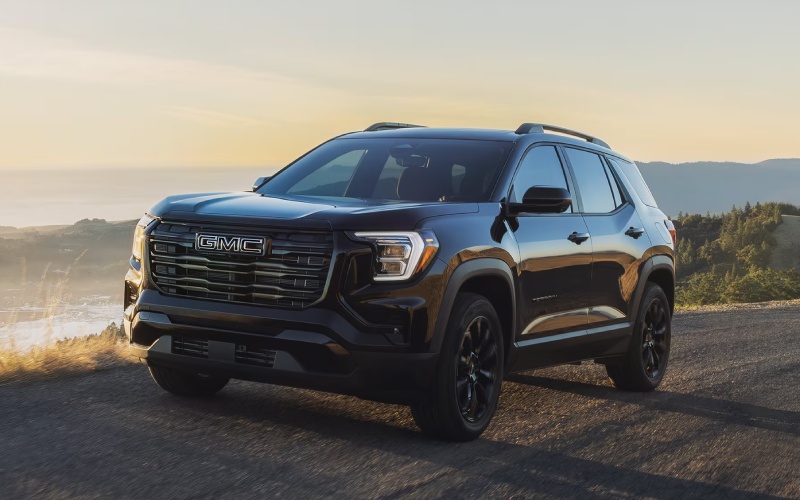
Mossy Motors – How the 2027 GMC Terrain’s 15-inch Screen Streamlines Daily Drives around Metairie, LA
The 2027 GMC Terrain gives Metairie drivers something you can feel every time you get behind the wheel: a smarter, less distracting cockpit built around a 15″ diagonal Premium GMC Infotainment System. Big screens aren’t about flash here. They’re about better sightlines, faster taps, and more information in view without clutter. In a compact SUV sized for errands along Veterans Memorial Boulevard or afternoons at Lafreniere Park, that matters. It keeps your focus forward and your hands closer to the wheel.
Think about how you use your screen on a typical day—navigation, audio, calls, maybe an app or two. On smaller displays, that can mean nested menus and multiple taps. The 15″ diagonal Premium GMC Infotainment System gives you the real estate to pin core functions where you want them and read maps or album art at a glance. Paired with the 11″ diagonal Driver Information Center, you get a clean separation of duties: essential driving data directly ahead and rich infotainment on the center stack. When traffic tightens around Causeway Boulevard, fewer steps and bigger targets feel less like tech and more like common sense.
Why the Larger Screen Makes a Real Difference
Clarity and usability are the real wins. Fonts are legible without squinting, menus are easier to scan, and map routes display more detail. If you rely on voice guidance, on-screen prompts and route previews are easier to verify quickly before you take a turn. That helps reduce the cognitive load of multitasking as you navigate, listen, and communicate on the go. The system’s layouts feel intuitive—swipe, tap, and go—so switching between navigation and your call list doesn’t disrupt your rhythm.
Another benefit is customization. You can configure the home screen to match the way you actually drive. Put navigation and media up front, shift frequently used apps to the near side, and let secondary items live a swipe away. It’s the kind of small optimization that pays off in hundreds of little moments over a week of commuting from Old Metairie to the CBD or back again.
Camera Views and Parking Confidence
Pair the 15″ diagonal display with available HD Surround Vision and the Rear Camera Mirror, and you’ll see how well the Terrain’s tech coordinates to solve real, local challenges—like narrow street parking or backing into a spot at a busy shopping center. With HD Surround Vision, multiple camera views stitch together into a comprehensive look at the space around your SUV. On a bigger screen, each angle is easier to interpret instantly. You can better see curb distance, line up with a spot, and confirm pedestrian movement at the edges.
The Rear Camera Mirror adds a high-definition rear view that can cut through typical obstructions such as cargo, passengers, or pillars. Tap between regular mirror and camera-enhanced view depending on the situation. Together, these tools enable deliberate, stress-lowering maneuvers in neighborhoods where visibility is at a premium.
Everyday Comfort Meets Smart Connectivity
The Terrain supports your day with available Google built-in integration and seamless smartphone pairing, so your contacts, routes, and media follow you without drama. Add available heated and ventilated front seats plus heated rear outboard seats on higher trims, and the cabin feels like a well-designed workspace for families and solo commuters alike. The 60/40 split-folding rear seat and rear underfloor storage add quick-switch versatility when it’s time to pick up supplies along Clearview Parkway or load up sports gear after practice.
Underneath the tech story is a chassis and powertrain tuned for ease. The 1.5L turbocharged 4-cylinder pairs with an 8-speed automatic for smooth, predictable responses at urban speeds, while available All-Wheel Drive and selectable drive modes help you feel settled as surfaces change. That foundation helps the tech shine because the vehicle itself is composed and confident.
Quick Tips to Get the Most from the 15-inch Display
- Customize Home: Arrange tiles so navigation and audio live on the primary screen, with less-used apps a swipe away
- Set Favorites: Save frequent routes and key contacts to reduce tapping during busy stretches of road
- Use Profiles: If multiple drivers share the Terrain, create profiles so each person’s screen layout appears automatically
- Pair Cameras: Activate available HD Surround Vision when parking and keep the Rear Camera Mirror toggled for improved rear visibility
These small setup steps take minutes, but the payoff is a simpler, calmer drive across your week.
Frequently Asked Questions:
How does the 15″ diagonal Premium GMC Infotainment System help reduce distraction?
The larger display makes on-screen targets easier to tap and menus faster to read. Core functions can be placed on the home screen, reducing extra steps. Paired with the 11″ diagonal Driver Information Center, it separates critical driving data from infotainment so your eyes stay where they should be most of the time—forward.
Do I need to choose a specific trim to get camera features?
Features vary by trim. The Terrain offers an HD Rear Vision Camera standard, with HD Surround Vision and the Rear Camera Mirror available on higher trims. If parking confidence is a top priority, ask our team to show you configurations that pair the camera tech with the screen setup you want.
Is the big screen helpful if I rely mostly on voice controls?
Yes. Even with frequent voice use, the larger display is useful for quick visual confirmation of prompts, routes, and media selection. It’s also easier to make occasional manual taps without slowing down your workflow.
Here’s the bigger point: technology should make life simpler, not busier. In the 2027 GMC Terrain, the 15″ diagonal Premium GMC Infotainment System is more than a standout spec—it’s a day-by-day advantage that helps you focus, move smoothly, and keep your attention where it belongs. That matters for Metairie errands, Causeway commutes, and everything in between.
We’re Mossy Motors, serving Metairie, Harvey, and Kenner, and we’re ready to help you explore how the Terrain’s technology—and the rest of its smart features—fit your daily drive. If you want a guided walk-through of the screen layouts, available camera views, or drive modes, we will personalize the experience so you see what matters most to you. The right setup is simple, and it pays off immediately the next time you put the Terrain in Drive.
Request more 2027 GMC Terrain information
Connect with us


- August 2026
- July 2026
- June 2026
- May 2026
- April 2026
- March 2026
- February 2026
- January 2026
- December 2025
- November 2025
- October 2025
- January 2025
- December 2024
- November 2024
- October 2024
- September 2024
- August 2024
- July 2024
- June 2024
- April 2024
- March 2024
- February 2024
- January 2024
- December 2023
- October 2023
- September 2023
- August 2023
- July 2023
- June 2023
- April 2023
- March 2023
- February 2023
- January 2023
- December 2022